
Healthy Eating Floor Games
A 4-in-1 floor pack for kids — brush, wash, shop, and catch healthy food.
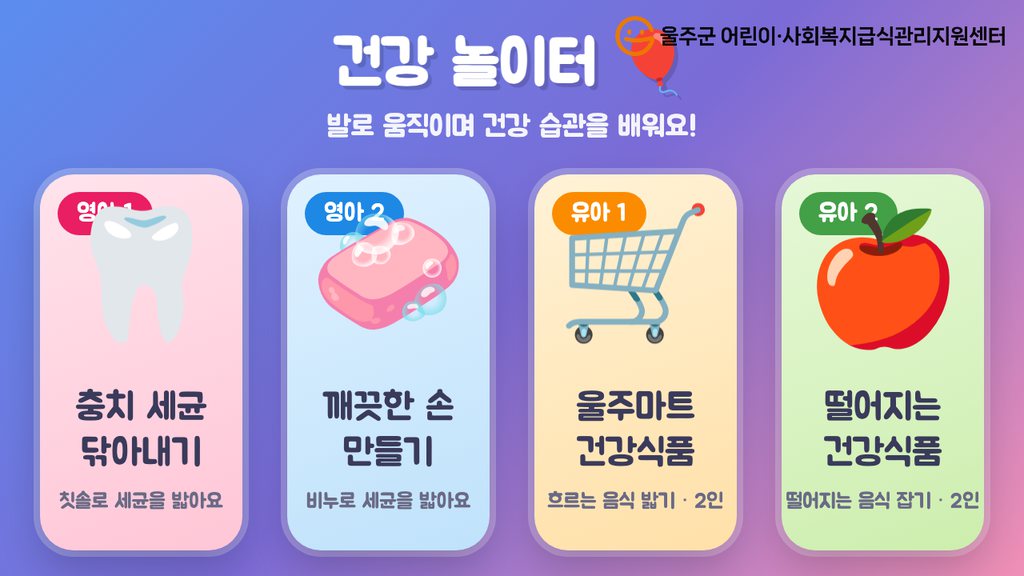
What happens in the room.
A four-in-one interactive floor pack that teaches young children healthy habits through their feet. One selector menu opens four quick games: brushing germs off teeth, washing hands with soap, picking healthy food at the market, and catching falling fruit. Kids step onto a projected floor and play with their whole body. Two can play at once (multitouch), rounds run about 30 seconds with a live score, and the four themes rotate to keep a class or a family line moving. Cheerful art, sound, and instant win screens make it a natural fit for children's centers, family zones, and education booths. Runs full screen on Windows or macOS. Designed for a floor projector with camera foot-tracking, and also plays on any ordinary screen with touch or a mouse.
No install, works offline. This edition ships with its original Korean interface. The pack bundles four quick rounds behind one selector menu. Brush the germs has kids stomp germs off the teeth with a toothbrush until they shine. Clean hands clears germs away with soap bubbles. Healthy market is a two-player race to step only on the healthy food riding the conveyor. And Catch the food is a two-player scramble to catch healthy fruit falling from the sky, each round about thirty seconds with a live score.
Compatibility
IF Series
IF-F (native)
Interaction
Touch · LiDAR
Surface
Floor
OS
Windows, Macos
How others use this.
- Use it where your audience already moves — entryways, lobbies, queue lines, activation corners.
Specifications
| Resolution | 1080p |
|---|---|
| Aspect ratio | 16:9 |
| Loop length | 30 seconds (seamless) |
| Min CPU | Intel i5 / Apple M1 |
| Min GPU | Integrated |
| Min RAM | 4 GB |
| Hardware required | Floor projector + touch/camera foot-tracking (or any screen with mouse); no install |
| Package size | ~33 MB (zip) |
Getting started
From the order email to the room glowing — about 3 minutes.
- Open the email with your download link and unzip the folder.
- Double-click
index.html. It opens in your default browser. - Press F11 (Windows) or Ctrl+Cmd+F (macOS) for fullscreen.
- Use Chrome or Edge for the best results.
Make it yours
Open customize/config.js in any text editor. Change the values, save, refresh the browser. Full guide inside the zip (customize/README-customize.md).
- Text and visuals. Welcome message, colors, logo.
No coding required — it's a plain text file with comments next to every option. If something breaks, restore the backup notes at the bottom of the same file.
What you'll need
- Windows 10/11 or macOS 12+
- Latest Chrome or Edge browser
- Floor projector + touch/camera foot-tracking (or any screen with mouse); no install
- ~33 MB free disk space
Delivery
Tell us a bit about your space and we'll send the build to your inbox within 24 hours. Windows and macOS files in one zip. Yours to keep, no expiry.